star

AI PowerPoint generator from text

Turn your text into stunning PowerPoint slides

Create professional layouts with our online platform in seconds without any design skills needed. Simply add your content, pick a design style, and let the tool convert text to PPT that is ready to use. Easily convert text to PowerPoint presentation formats without any manual formatting.
Convert Text to PPT

Quickly create presentations from text with only four easy steps

By instantly turning your written content into slides, our AI presentation generator from text saves you many hours of formatting effort.

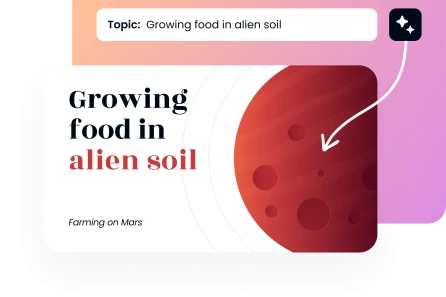
Step 1: Either paste the text or input the subject.

Put your ideas, notes, sketches, or even full paragraphs into the text box. No matter what format you offer, our AI presentation generator from text can handle it. You may either paste your text or input your topic. As the AI examines your material and arranges your presentation logically, the platform immediately highlights important ideas.
Create Presentation
Step 1: Either paste the text or input the subject.

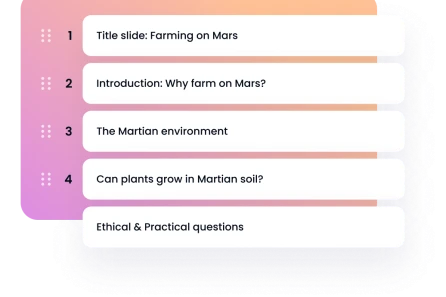
Step 2: Customise your options and make content editing a breeze.

Personal, Professional, Creative, Minimal, Corporate, Academic, or Startup Pitch are the available presentation styles and tones. Make sure to change the amount of editable slides from 5 to 25, allowing you to quickly make changes to each presentation later on.
Step 2: Customise your options and make content editing a breeze.

Step 3: Select a template that has been expertly created.

Pick a premade layout that works for your content right out of the gate by browsing our library's hundreds of designs. The visual cohesion of your presentation deck is guaranteed by each arrangement. You can rest certain that your slides will always be consistent with your brand with our well crafted solutions.
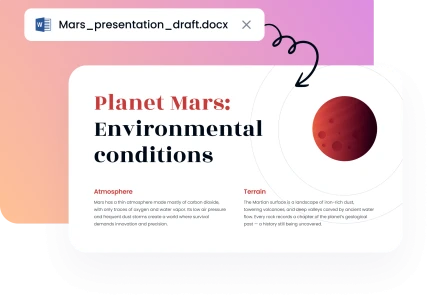
Step 3: Select a template that has been expertly created.

Step 4: Immediately download your presentation.

You may now download the presentation that was prepared automatically by AI. A completely editable PPTX version of your presentation is available for download. If you think the project may use some more tweaking, you can open the file in Google Slides or Microsoft PowerPoint and make those modifications.
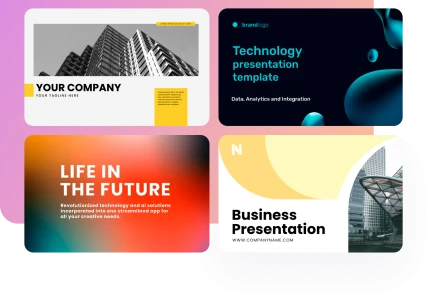

Create Presentation
Step 4: Immediately download your presentation.
Relied upon by over 200K people globally
image
image
image
image

Reasons to use our AI-powered text-to-PowerPoint converter

Transform your writing or Word into a PowerPoint presentation with ease. If you're a professional, educator, or student in need of a quick, efficient, and high-quality presentation, our AI-powered skills are here to help.
image

Complete anonymity guaranteed:

By encrypting your files at rest, no one other than you will be able to view your cited works or final presentations.
image

Quick PowerPoint development:

Spend less time preparing and more time delivering your message with our AI-powered PowerPoint generator.
image

Interface that is easy to use:

With our user-friendly platform, anybody can convert text to slides with ease. Rapidly create eye-catching visual narratives using this tool.
image

Templates of professional quality:

Pick from a library of professional layouts and turn PDF to PPT; all of them are designed to provide impressive presentations with easy-to-read text. Go ahead and add your own photos if you like.
image

Time-saving process:

Make presentations from text much more quickly than by hand, and you won't even need a designer, which is a huge money saver.
image

Customises to meet your requirements:

Ideal for presenting and selling presentations, project summaries, training materials, market analyses, or academic assignments. Every situation may be adjusted by our AI PPT generator that is based on text.
Show more

Use expert presentation tools to quickly transform text into PowerPoint
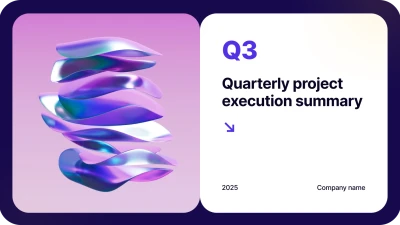
When you want to turn your thoughts into beautiful layouts, our pitch deck AI tool is always spot on. Whether you are working on a presentation for a school assignment, a professional presentation for work, or educational material, we have everything you need to make your ideas a reality. Make a well-organised slideshow out of your content and share it with your team or coworkers for a straight presentation. Make quick work of changing the font or layout style.

Business
Business
Business
Business
Business
Business
Business
Business
Business
Business
Business
Business
Business
Business
faces

The reasons why Decksy's text-to-PPT AI generation is so popular

Learn how our AI can help you make PowerPoint presentations out of any text. Time is saved and excellent outcomes are achieved with both of them.
stars
Our Sales Procedures Were Redesigned
We have seen a considerable improvement in our proposal turnaround time since implementing this technology. Thanks to our improved process, we can now convert meeting notes into client presentations in a matter of minutes, leaving a lasting impression on audiences with our promptness and competence.
icon
Jennifer L., Business Development Manager
stars
Essential for the Creation of Courses
My whole weekend would be devoted to creating lecture materials. I can now spend more time interacting with students and coming up with research ideas since this AI text-to-presentation tool uses my results to create slide presentations.
icon
Dr. Mark H., Graduate School Professor
stars
Effective Campaign Strategy
At any given moment, our firm is juggling the needs of several clients. With our text to PowerPoint converter, you can quickly turn campaign briefs into eye-catching presentations. We may now share marketing plans with all of our clients.
icon
Rachel T., Digital Marketing Lead
stars
Get Your Funds Raised More Rapidly
Precise work under pressure is required for investor presentations. Three venture capital companies gave me seed money after I used this software to create a compelling presentation deck based on my company strategy.
icon
Kevin W., Tech Entrepreneur
stars
Improved Participation from Students
Students in my class use this program to create fantastic project presentations independently. The results are complex enough for use in school projects and parent-teacher conferences.
icon
Ms. Patricia D., Middle School Educator
stars
Streamlined Training Development
Our department was no longer benefiting from onboarding seminars. All new hires receive uniform training, and our staff can now generate whole presentation decks automatically from process documentation.
icon
Lucas M., Corporate L&D Coordinator
Show more

Frequently asked questions about our AI presentation generator

What is the best way to make an AI presentation out of text?

Using our online platform is as simple as opening an account, pasting your material, and then starting to input text or upload a document. The next step is to choose a polished template design after which you may customise the tone and number of slides. Last but not least, click to finish having our presentation generator make your slides.

Is it possible to use bullet points or paragraphs as input?

Both are acceptable, yes. Paragraphs, lists, bullet points, or even raw data may all be inputted into our artificial intelligence PowerPoint generator. Whenever you input text into PowerPoint, the AI text engine will automatically match it to the content of your presentation.

Why is your AI tool superior to making slides manually?

Formatting slides by hand takes a lot of time. So that you may create presentations without erasing any text context, our text to PPT AI application automates the entire process.

Do you support other languages besides English?

Our text-to-presentation technology is multilingual. Without changing a word, our AI presentation builder will generate slides that use your original wording.

Will I be able to create presentations out of long documents?

You will. Word, Excel, PDF, plain text (TXT), PowerPoint, and markdown can be converted to PPT files and are all generally acceptable file types for uploading. You may download or modify the information offline in Google presentations or Microsoft PowerPoint if you want to, and our AI will organise the content into polished presentations after extracting important themes and details.

Can I create as many presentations as I want?

You may create a whole presentation every day with our free AI presentation plan. With our premium account, you may use our converter as often as you want, whenever you want, to export presentations. Make your dreams a reality with the help of AI's efficiency. Input a short prompt or utilise our AI generator, and in a matter of seconds, the AI will turn your writing into a stunning presentation.

Our tool is easy to customize and always ready to help you turn text into art

Create presentation from text